
“I’m at the restaurant”, “order isn’t ready”, and help with the order
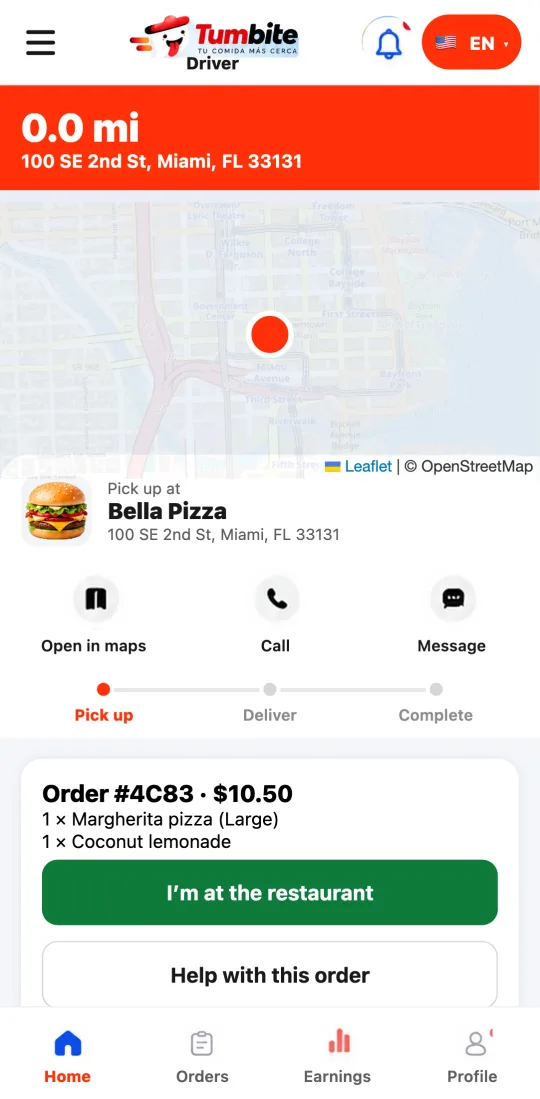
The active order has three new buttons: to say you arrived at the restaurant, to record that the order isn’t ready, and to get help with clear reasons or call emergency services.
How it works
“I’m at the restaurant”: confirms your arrival with your position. It works within 200 meters of the store; if you’re farther, the app tells you how many meters. GPS also marks the arrival on its own, but with the button it’s recorded right away and the restaurant knows you’re there.
“Order isn’t ready”: if you arrived and the restaurant hasn’t finished, tap it. The restaurant gets a notification and it goes on the order’s record: that wait doesn’t count against you.
“Help with this order”: pick the reason (the restaurant is closed, the order is wrong or incomplete, I can’t find the address, I had an accident or a vehicle problem, something else), add details if you want, and your conversation with support opens with the order attached.
Emergency: calls 911 from the app and Tumbite is notified.
Steps
- When you get to the restaurant, tap “I’m at the restaurant”.
- If it isn’t ready, tap “Order isn’t ready”.
- For any problem, tap “Help with this order” and pick the reason.
This guide answers
- How do I say I arrived at the restaurant?
- What do I do if the order isn’t ready?
- How do I get help during a delivery?