
Call the customer without seeing their number (or showing yours)
On the way, tap “Call the customer (masked number)”: we call you and connect you with the customer. You both see Tumbite’s number.
How it works
If you can’t find the address or the customer isn’t answering the chat, tap “Call the customer (masked number).” Tumbite calls your phone and, when you answer, dials the customer. They see Tumbite’s number, not yours, and you don’t see theirs.
For that, your account needs your mobile number (it’s under “My details”). If the customer has no mobile number on file, the app tells you and leaves you the chat.
The customer can call you the same way. Every call is noted on the order in case of a claim.
The customer also gets their alerts automatically: “arriving in 5 minutes,” “come out to meet your driver” (hand delivery) and “at your door,” by SMS as well.
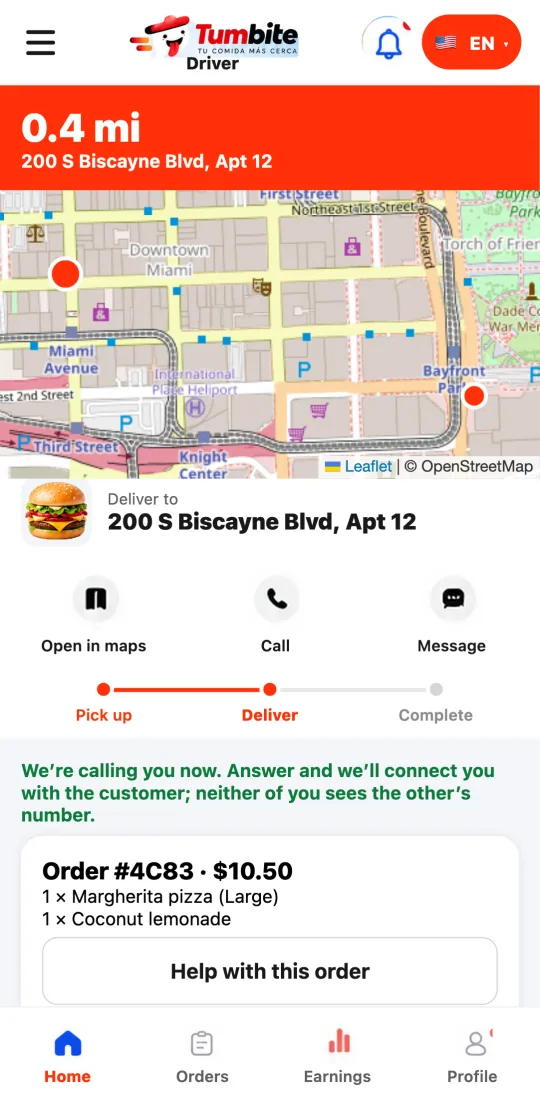
Steps
- On the way, tap “Call the customer (masked number).”
- Answer Tumbite’s call: it connects you with the customer.
- If they have no mobile number, message them through the order chat.
This guide answers
- How do I call the customer if I can’t find them?
- Does the customer see my phone number?