
Daily summary and your wallet
Orders, sales, commission, and your payout. Cash out to your bank.
Steps
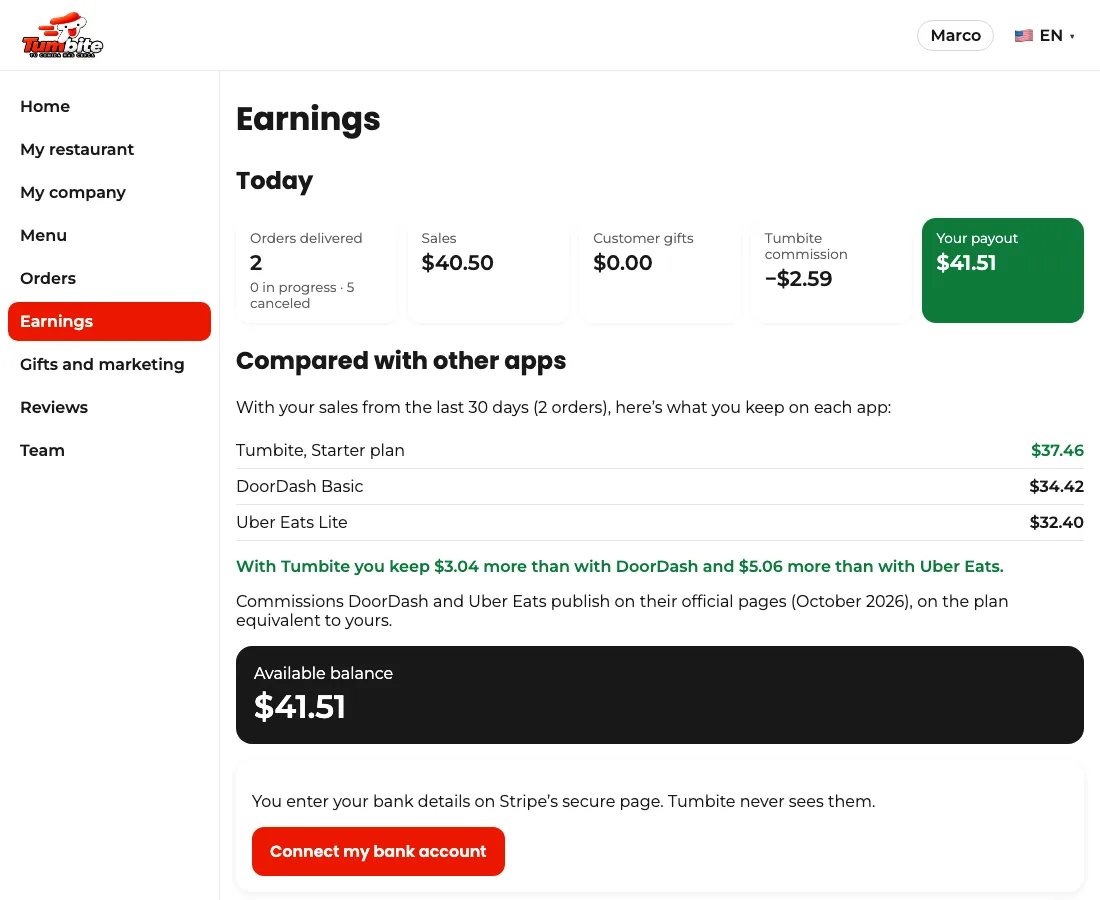
- In “Earnings” you see today: delivered orders, sales, gifts, commission, and, in green, your payout.
- The first time, tap “Connect my bank account”: Stripe asks for your details once, on its secure page.
- Your available balance grows with every delivered order, and below you see each sale with its order number. Cash out anytime, from one dollar.
- Your plan (Starter, Growth, or Elite) sets the commission. Ask us to change plans anytime.
- In “Compared with other apps” you see, with your real sales from the last 30 days, what you keep with Tumbite and what you’d keep with DoorDash or Uber Eats on the equivalent plan.
This guide answers
- When and how do I get paid?
- How do I connect my bank account?
- How much does Tumbite charge?