
Orders collected in person and your balance for fees
In cities where it’s active, some orders are paid on delivery: the customer pays you in cash or by transfer, you pay for the food at the counter, and Tumbite’s fee comes out of a balance you top up in advance.
How it works
The offer tells you before you accept: whether the customer pays in cash or by transfer, and how much you’ll pay at the store with your own money. You decide with everything in view.
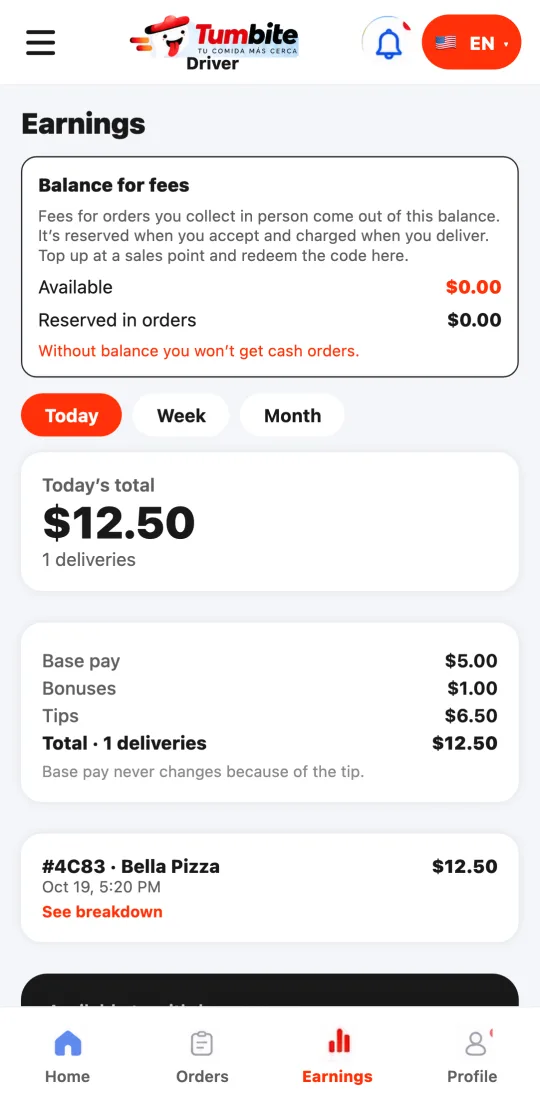
Before accepting an order paid in person you need balance for the fee. You top it up by buying a code at an authorized sales point and redeeming it under Earnings → “Balance for fees”. Without balance you don’t get cash-order offers (card orders still come).
When you accept, the fee is reserved from your balance; when you deliver and confirm the payment, it’s charged. If the order is canceled or you drop it, it goes back to your balance in full.
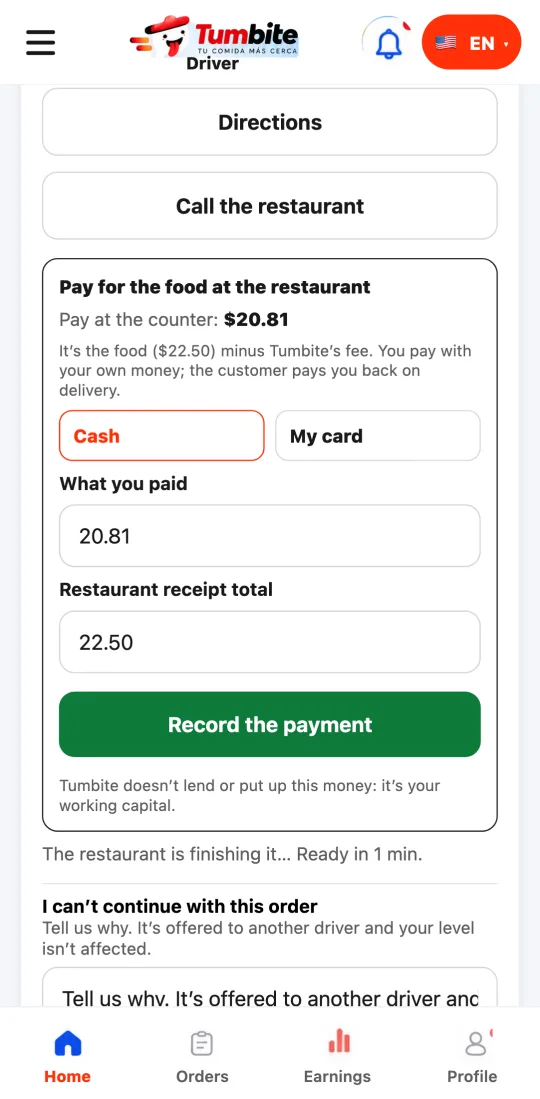
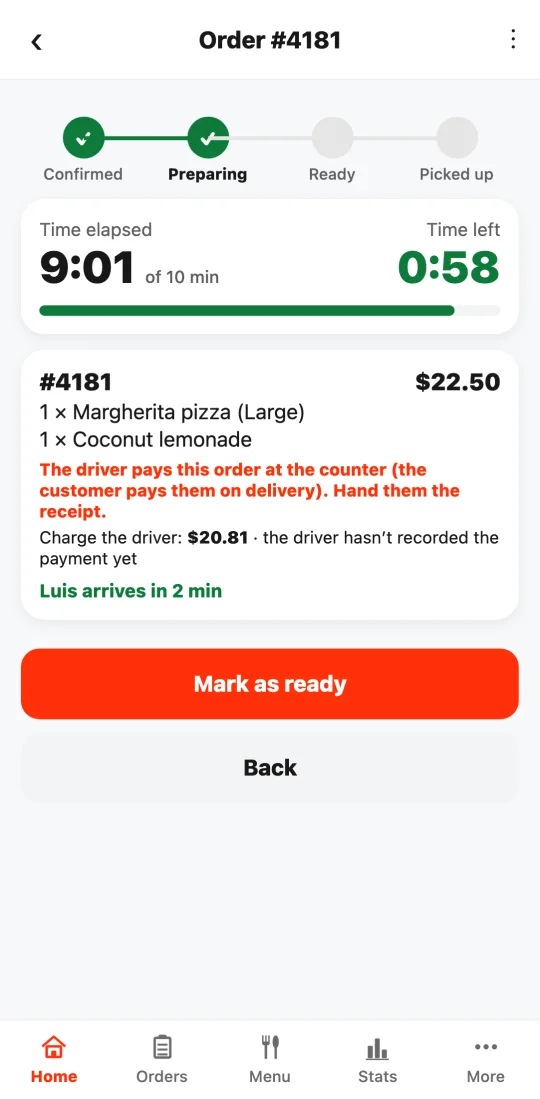
At the restaurant the app tells you how much to pay at the counter: the food minus Tumbite’s fee. You pay with your own money, in cash or with your card (it’s your working capital: Tumbite doesn’t lend it), and under “Pay for the food at the restaurant” you enter what you paid and the receipt total. Without that record the order can’t leave. You can also take a photo of the receipt: the restaurant, the customer and support can see it if there’s a claim. If something doesn’t match, it’s noted and support reviews it; it doesn’t stop you.
Hand the receipt to the customer with the order. At the door you see how much they owe you (without the tip). Tap “Collected” and enter what you received. It’s your own confirmation, not a bank check: who confirmed, how much and when are recorded. If they paid less, the difference becomes the customer’s debt, not yours; if they paid more (for example, a repeated transfer), it’s recorded that you owe them the difference back.
If it’s a transfer and you don’t see it in your bank yet, tap “The transfer hasn’t reached me yet”: you can deliver, the payment stays pending and your fee stays reserved. When you see it, confirm what arrived; if it never arrives, confirm 0 and the customer gets a debt (they can file a claim).
If the order is canceled after you paid for the food, that payment stays recorded under your name as a loss pending review; it never disappears. Once you paid for the food you can’t drop the order on your own: deliver it or contact support.
If the customer doesn’t pay, tap “The customer didn’t pay”: the order is canceled, the customer gets a debt and your reserved fee goes back to your balance. Take the food back to the restaurant.
An order paid in person can’t be left in a safe place: if the customer doesn’t show up, use “The customer didn’t pay.” Once you’ve confirmed the payment, that button no longer applies.
To receive transfers, publish your account in your profile: account holder’s name and number. Changing it asks for your password, emails you, and takes effect in 24 hours (or sooner if the team confirms it). You confirm each transfer by checking your own bank: Tumbite never accesses your account.
A cash tip is yours and isn’t counted in the payment.
Steps
- Buy a top-up code at a sales point and redeem it under Earnings.
- Accept the cash order: the fee is reserved from your balance.
- Pay for the food at the counter and enter what you paid and the receipt total.
- Hand the receipt over with the order.
- At the door, collect the total without the tip and tap “Collected” with what you received.
This guide answers
- Why don’t I get cash orders?
- How do I top up my balance?
- What if the customer doesn’t pay me?