
If the restaurant is out of an item in your order
Nothing gets canceled outright: you decide whether to remove it (we refund that part) or cancel the whole order.
How it works
Before cooking starts, the restaurant can flag that it’s out of one of your items. You get a notice and two options appear in your order.
“Remove it and continue”: that item is taken out, the total is recalculated and we refund the difference to your card. The rest continues as usual.
“Cancel the whole order”: we refund the full total.
If you don’t answer within 5 minutes, we remove the item and refund its part so the rest doesn’t sit around waiting.
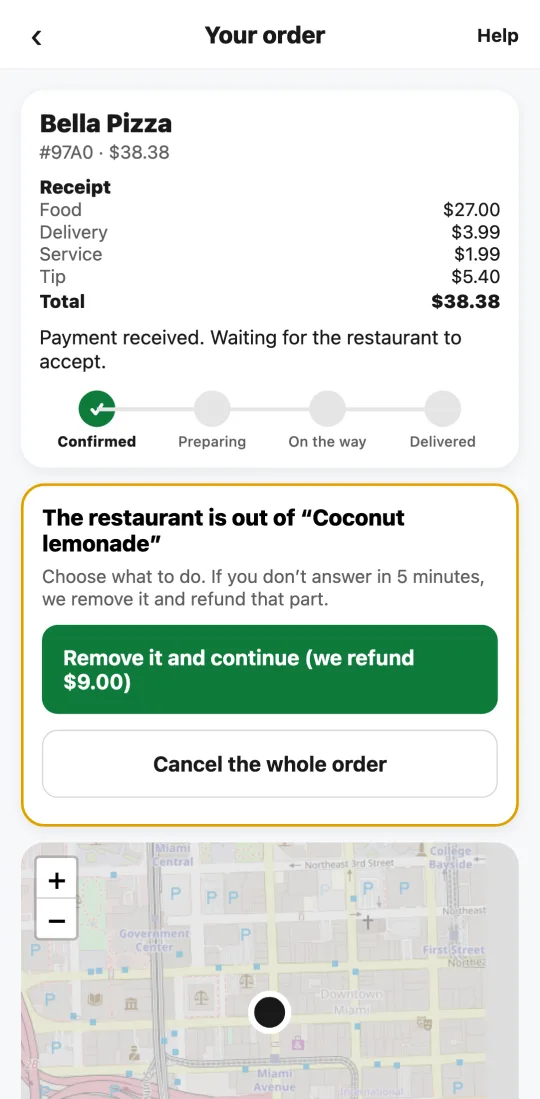
Steps
- You get the notice; open your order.
- Tap “Remove it and continue” or “Cancel the whole order.”
- The refund goes back to your card right away; your bank shows it within a few days.
This guide answers
- What happens if the restaurant is out of something I ordered?
- Do I get a refund for the missing item?