
Ready to open: what you need before taking orders
Before turning on “Taking orders,” your restaurant needs a phone number, an address with a pin, hours, and at least one dish with a price. The checklist tells you what’s missing.
How it works
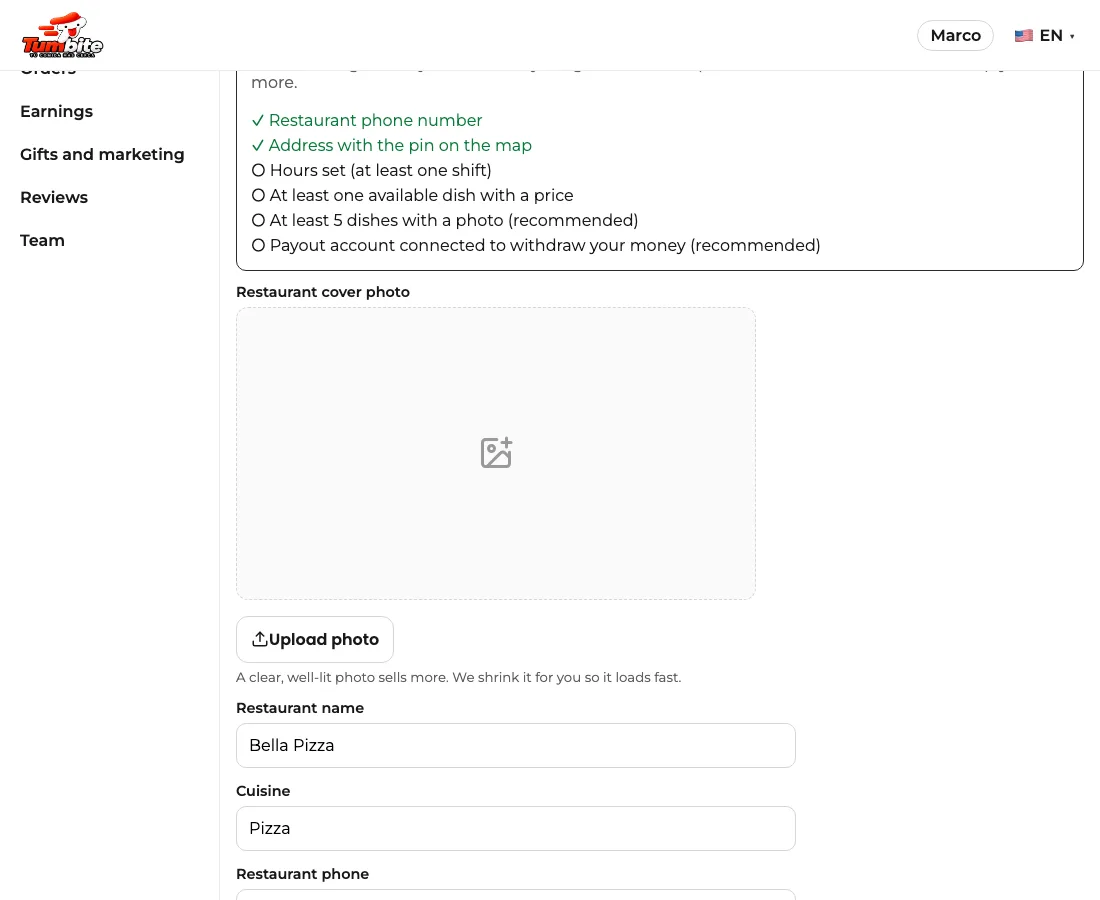
In “My restaurant” you’ll see the “Ready to open” checklist. Each item gets a green check when it’s done.
Required: the restaurant’s phone number (so the driver or our team can reach you), the address with the pin on the map (so the driver can get there), hours set (at least one shift), and at least one available dish with a price. Without those, the open button doesn’t turn on and tells you why.
Recommended: at least 5 dishes with a photo (restaurants with photos sell much more) and the payout account connected and activated to withdraw your money (the item is checked once Stripe confirms your account; in the meantime, your sales accumulate in your wallet).
Once everything required is done, the checklist says “Everything is ready to open” and you can take orders.
Steps
- Go to “My restaurant” and look at the “Ready to open” checklist.
- Complete what’s missing: phone, address with pin, hours, and a dish with a price.
- Tap “Open and take orders.”
This guide answers
- Why can’t I open my restaurant?
- What do I need to start taking orders?