
If you’re out of an item or need more time
Flag the item you’re out of and the customer decides in their app; and if you’re running late, add minutes before the driver leaves.
How it works
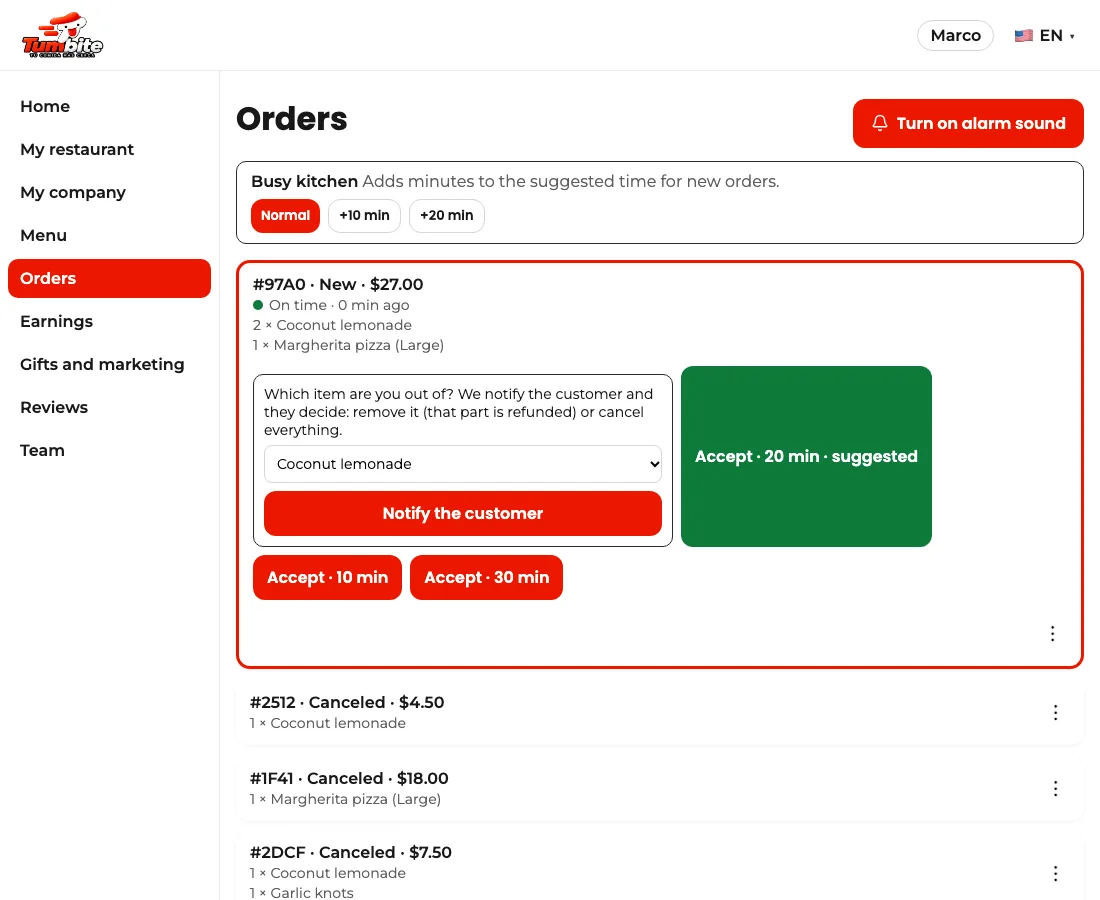
On the order, open the three dots and tap “I’m out of an item.” Pick which one and “Notify the customer.” The customer gets a notice and decides: remove it (that part is refunded) or cancel everything. While they decide, the order waits and the Manager doesn’t count that time against you.
If the customer removes it, the order comes back with the remaining items and you accept it as usual. If they don’t answer in 5 minutes, it’s removed automatically.
If you already accepted and you’re running late, tap “+5 min” as long as no driver has left: the driver then arrives at the right time and the customer sees the new time. Once a driver is on the way, the time can’t change: let them know in the app.
Steps
- Order’s three dots → “I’m out of an item” → pick the item → “Notify the customer.”
- Wait for the answer (up to 5 minutes) and accept the order with the rest.
- Running late? “+5 min” before the driver leaves.
This guide answers
- What do I do if I’m out of an item on an order?
- Can I change the prep time after accepting?