
Coupons and promotions
Enter a code in the cart and the discount applies before you pay. Current promotions show under “Today’s deals” on the home screen.
How it works
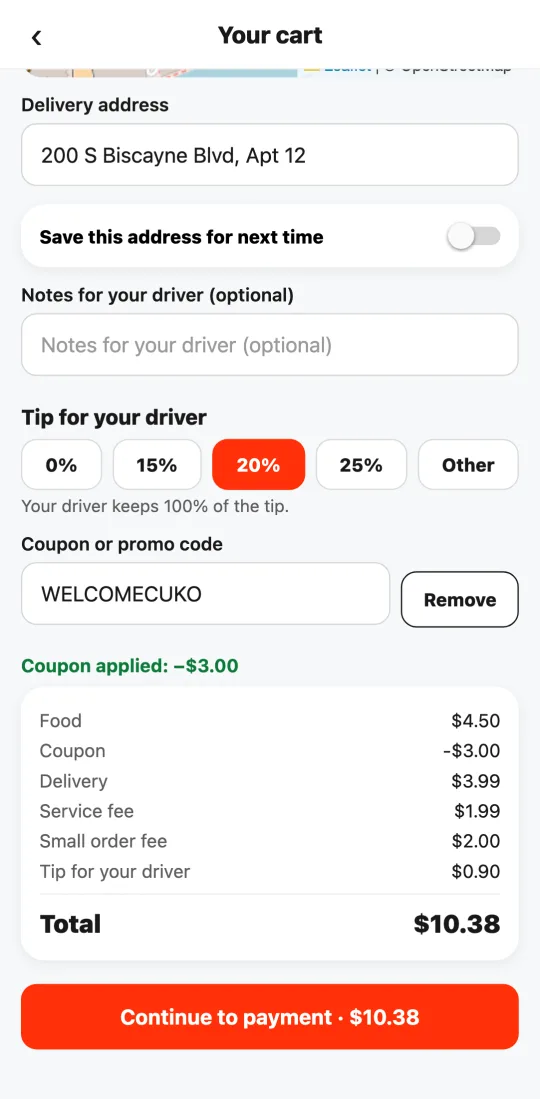
In the cart, under “Coupon or promo code”, enter the code and tap “Apply”. If it’s valid you’ll see “Coupon applied” and the discount in the breakdown; if not, we tell you why (expired, another restaurant, below the minimum, already used).
There are fixed-amount coupons, percentage-off-food coupons and free-delivery coupons. Some are only for your first order or for one restaurant.
The discount never comes out of the restaurant or the driver: Tumbite covers it.
Steps
- Enter the code in the cart and tap “Apply”.
- Check the discount in the breakdown and pay.
This guide answers
- Where do I enter a coupon?
- Why isn’t my code accepted?