
Divoox Flex: pickup at your hub, with a deadline
The package stays at your hub and the recipient picks it up with their ID and the tracking number within 5 business days. If it’s paid on delivery, they pay there.
How it works
Besides home delivery, each shipment can be picked up at one of your hubs, like at an agency. When you create it, choose “Pickup at the hub” and the hub.
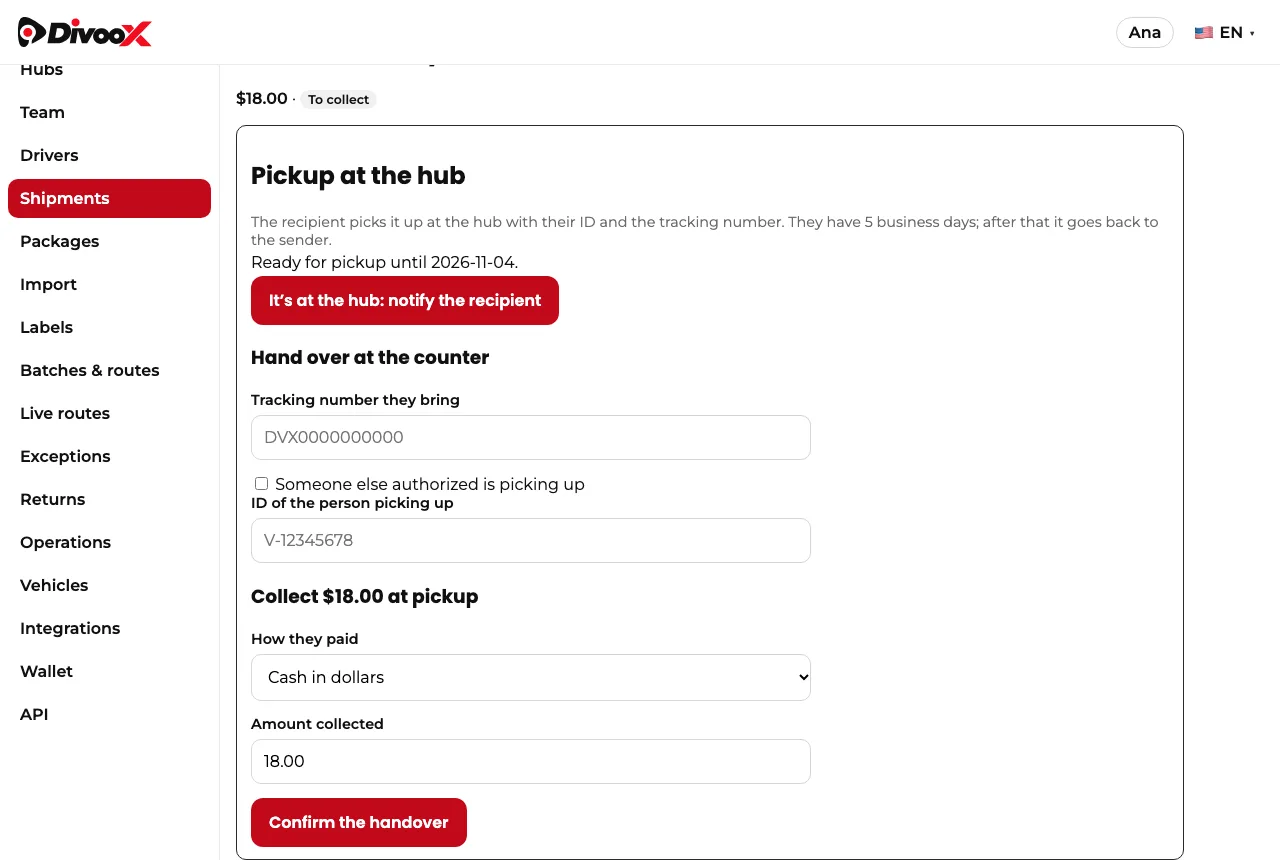
When the package is at the hub, tap “notify the recipient” and Divoox prepares the WhatsApp message: where to pick it up, until which day, what to bring and, if it’s paid on delivery, how much.
At the counter you enter the tracking number the person brings. In Venezuela also their ID, which must be the recipient’s; if someone else picks it up, they’re marked as an authorized third party and it’s recorded. If the shipment is paid on delivery, you record how they paid and the money is already in your cash.
There are 5 business days to pick it up. If the deadline passes and nobody picked it up, the package goes back to the sender with one tap.
What’s picked up at a hub never goes on a delivery route.
Steps
- When you create the shipment, under “How it’s delivered”, choose “Pickup at the hub” and the hub.
- When the package is at the hub, open the shipment and tap “It’s at the hub: notify the recipient”.
- At the counter, enter the tracking number and the ID, record the payment if there is one, and tap “Confirm the handover”.
- If 5 business days pass, tap “Deadline passed: return to sender”.
This guide answers
- How do I let the customer pick up the package at my store?
- How long do they have to pick it up?
- Can someone else pick it up?