
Prepare a store order: what to do if an item is out
Under each item in the order you see what the customer wants if you don’t have it: a refund, something similar at no extra charge, or a question in the chat.
How it works
A store order comes in just like a food order: the alarm rings, you accept it, prepare it and hand it to the driver. The difference is on each item: underneath it says what the customer wants if you don’t have it.
“If out: refund it” means you remove it with “An item is missing” and Divoox refunds the customer what they paid for it. “Something similar, no extra charge” means you pack a similar item at the same price or less: the charge doesn’t change. “Ask the customer in the chat” means you message them in the order chat before deciding.
Items sold by weight are charged at an estimated weight. If they weigh less, remove the difference; the customer is never charged more than they agreed to.
Items with alcohol or tobacco are marked: the driver asks for ID at delivery.
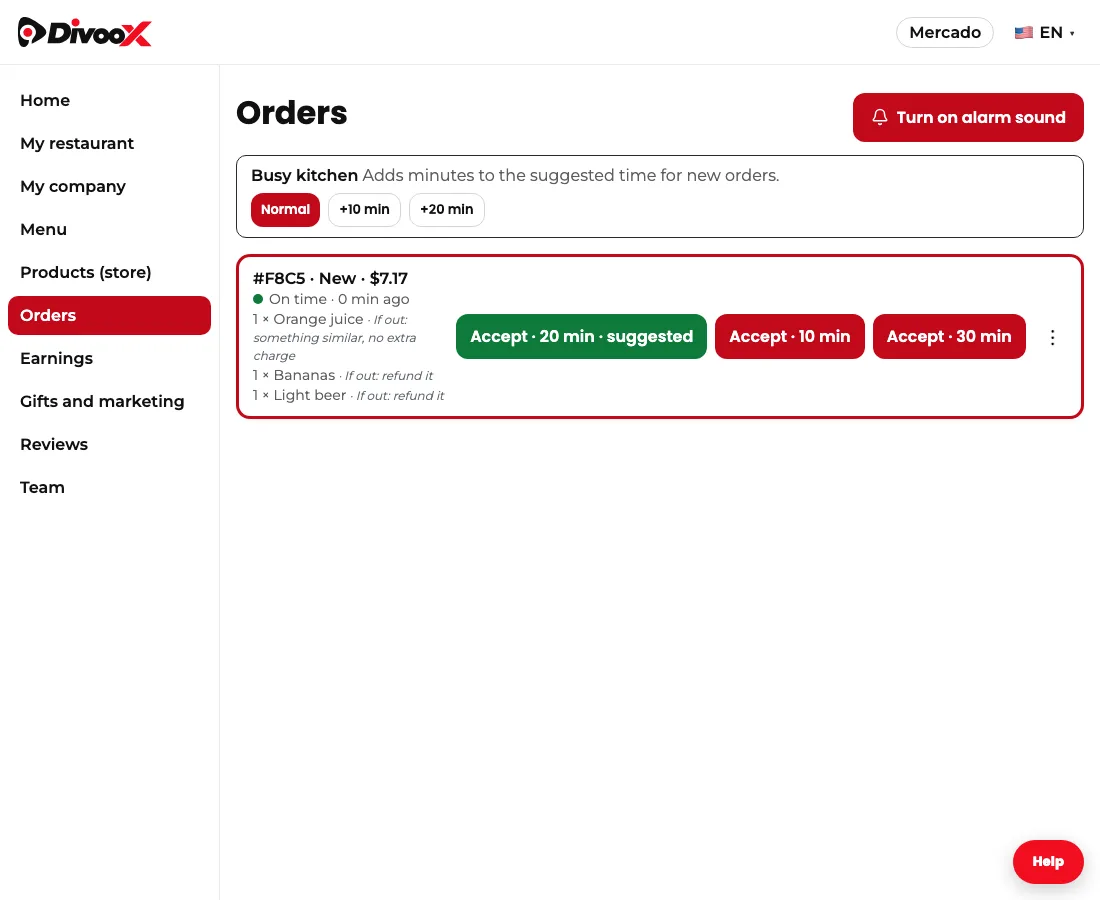
Steps
- Accept the order when the alarm rings.
- Read under each item what the customer wants if it’s out.
- If one is out and they asked for a refund, tap “An item is missing” and pick it.
- If they asked for something similar, pack one at the same price or less.
- If they asked to be contacted, message them in the order chat.
- Mark the order ready and hand it to the driver.
This guide answers
- What do I do if I don’t have an item in the order?
- Can I swap an item for something similar?
- How do I charge for items sold by weight?