
Schedule an order for later
Pick the day and the half hour when you want your order, from one hour ahead up to six days out.
How it works
In the cart, under “When do you want it?”, tap “Schedule”. You see the days and, below, the half-hour windows when the restaurant or store is open.
The price and delivery fee are the same as ordering now. Your card is authorized when you order and charged on delivery, as always.
The restaurant sees your order marked “Scheduled” with its time, and 45 minutes before it gets an alert to start preparing it so it arrives within your window. The driver gets it in time for that.
Your order screen shows “Scheduled for” with the day and time. Until the restaurant accepts it, you can cancel and get your money back.
You can’t schedule on the store’s holidays or outside its hours.
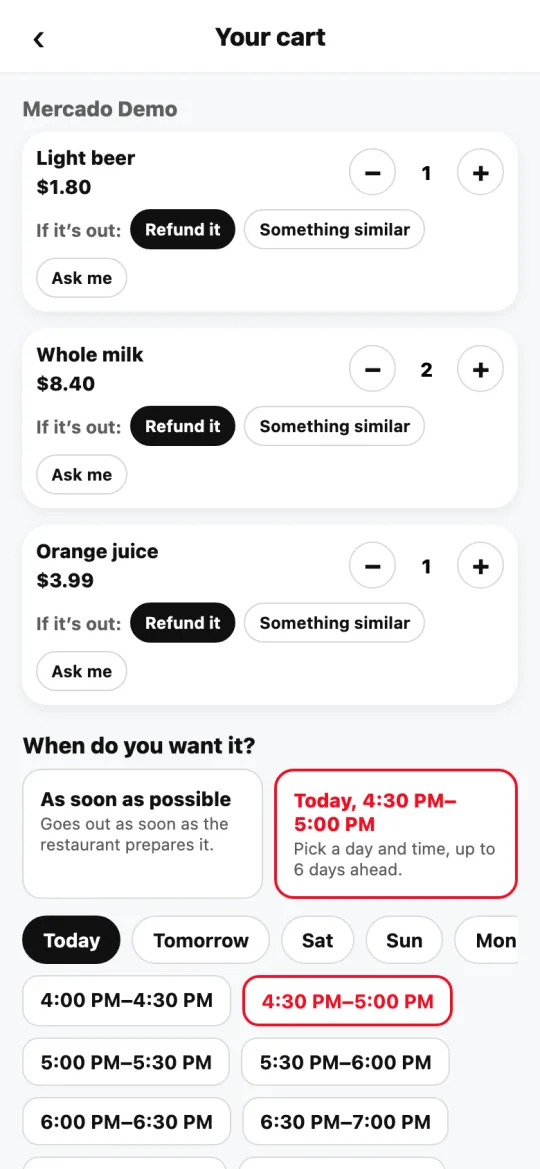
Steps
- Build your cart as usual.
- Under “When do you want it?”, tap “Schedule”.
- Pick the day and window, and pay.
This guide answers
- Can I order food for tomorrow?
- Does scheduling cost more?
- How far ahead can I schedule?