
Your year: deliveries, miles and earnings by month
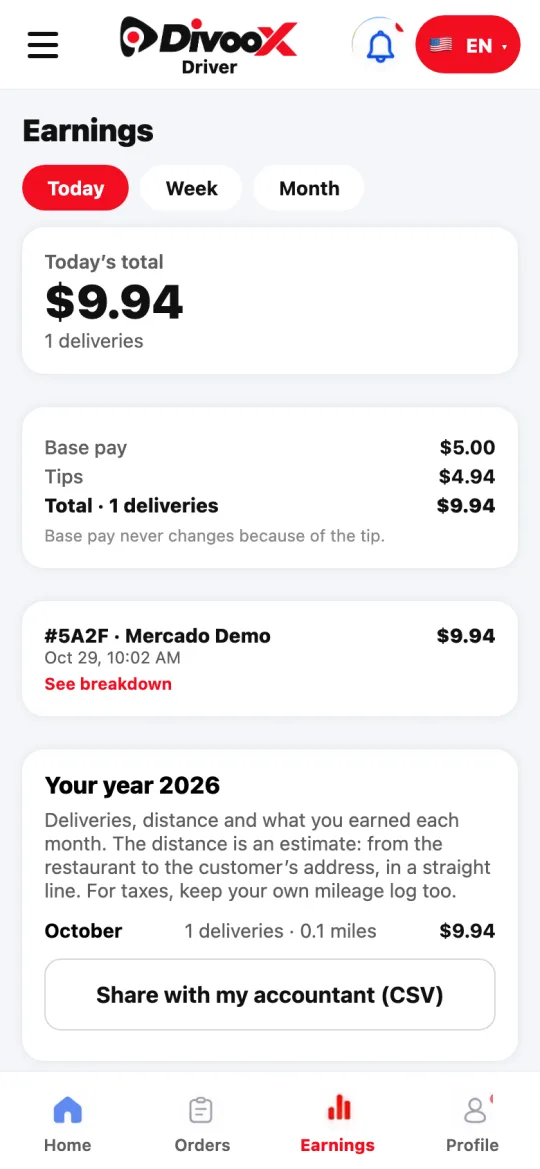
In Earnings you see your year month by month: how many deliveries you made, the estimated distance and what you earned, and you can share it with your accountant as a file.
How it works
Below your earnings you’ll find “Your year”: each month with its deliveries, miles and what you earned (base pay, bonuses and tips).
The distance is an estimate: from the restaurant to the customer’s address, in a straight line. It doesn’t include the drive to the restaurant. For taxes, keep your own mileage log too.
“Share with my accountant” builds a CSV file that opens in Excel or Google Sheets.
Steps
- Open the Earnings tab.
- Scroll down to “Your year”.
- Tap “Share with my accountant” and choose how to send it.
This guide answers
- Where do I see what I earned this year?
- How do I get my miles for taxes?