
Request a motorcycle ride
Choose where you’re going, see the price before you confirm, and follow your driver on the map until they arrive.
How it works
Divoox Moto gets you across the city fast. It’s available in the cities where Divoox Moto is open; if it isn’t open in yours yet, the app won’t let you request it.
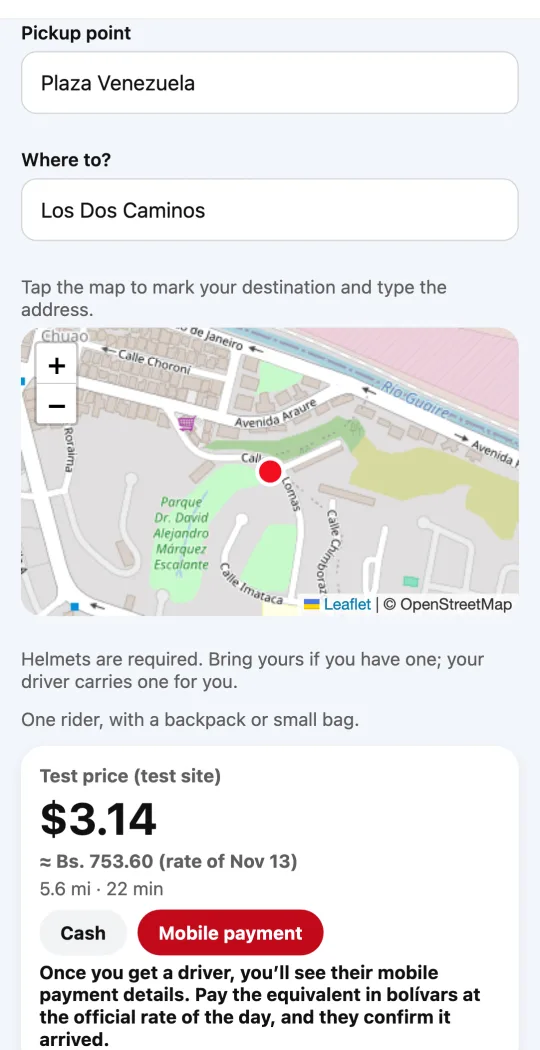
The price is upfront: you see it before you request and it doesn’t change with traffic. In Venezuela the price is in dollars, with its equivalent in bolívars at the day’s rate next to it.
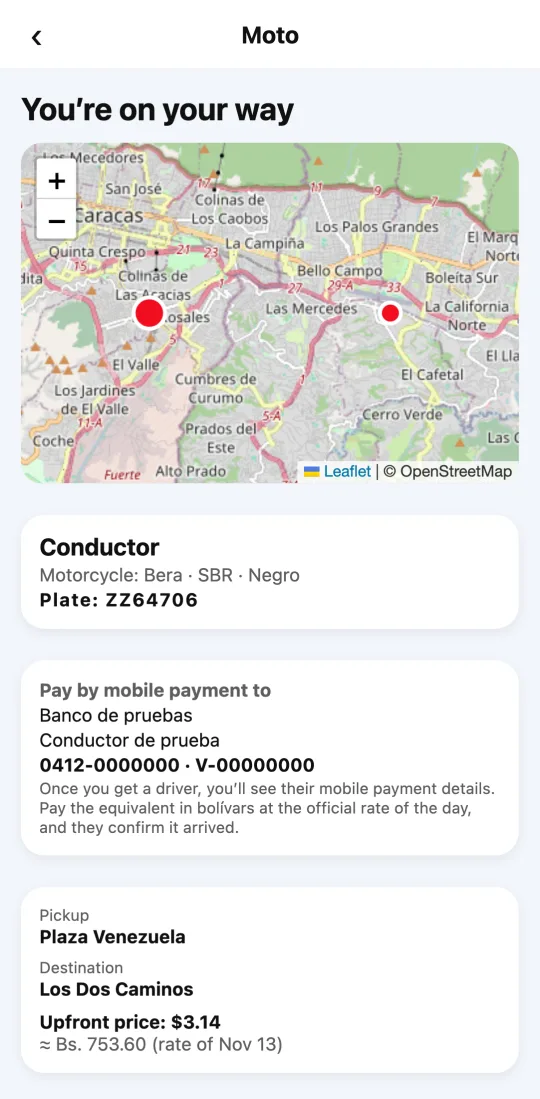
When you confirm, we find the nearest driver. Once they accept, you see their name, motorcycle, color and plate, and you can follow them on the map.
To start the ride, in cities that use it, you tell the driver your four-digit code. That way you know you’re getting on with the right person.
Steps
- Open Divoox and tap “Moto”.
- Confirm your pickup point (you can move it on the map) and enter your destination.
- Check the upfront price and choose how to pay: the app shows the methods available in your city (in Venezuela, cash or mobile payment).
- Tap “Request”. When a driver accepts, you’ll see their details and location.
- When you get on, check the plate and, if the app shows a code, tell it to the driver.
Always wear the helmet your driver offers you.
This guide answers
- How do I request a motorcycle ride?
- Can the price change?
- What is the ride code for?