
Your fee balance and how to top it up with a code
Fees for orders you collect in person come out of your balance; the app tells you how many orders it covers, and you top up with a code.
How it works
In countries where you collect in person, the Divoox fee isn’t taken from a card payment: it comes out of your fee balance. It’s reserved when you accept the order and charged when you deliver; if the order is canceled, it goes back to your balance.
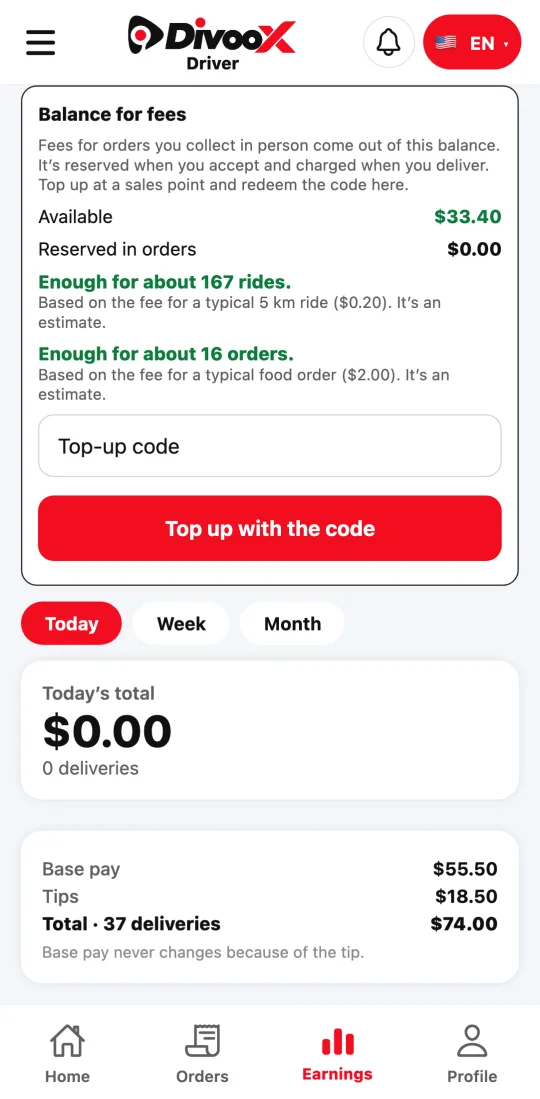
Under “Earnings” you see your available balance, what’s reserved in orders, and an estimate of how many orders (and rides, if you drive Moto or Car) it covers. When it’s running low, the notice turns red.
To top up, you pay at an authorized sales point and get a code. Enter it under “Top-up code” and tap “Top up with the code”: the balance is added right away.
Without a balance, you don’t receive orders paid in person.
Steps
- In the app, tap “Earnings” and check your fee balance.
- To top up, enter the sales point code under “Top-up code” and tap “Top up with the code.”
This guide answers
- Where does the fee for a cash order come from?
- How do I top up my balance with a code?
- How many orders does my balance cover?